You Got Three Bids. They Span $18,000 to $55,000. For the Same Bathroom.
None of them break out materials from labour. None of them define "finish work" the same way. None of them mention permits, disposal fees, or the asbestos test your 1970s house probably needs. You cannot tell which bid is reasonable because the quotes are fundamentally incomparable.
So you pick the middle bid, set aside 10% for contingencies like every article suggests, and sign the contract.
Six weeks later, the contractor finds knob-and-tube wiring behind the drywall. The tile installer is charging $1,900 for a 60-square-foot mudroom that was quoted at $850. Someone ordered custom-colour siding $4,000 over allowance without asking you. Your 10% contingency evaporated in week two. You are now funding the project with a credit card and a growing sense of dread.
This is not bad luck. Roughly 37% of homeowners exceed their renovation budget. On complex gut renovations, the overrun rate exceeds 70%. The standard "set aside 10%" advice is a relic --- industry data and professional investor underwriting models recommend 15-20% for any major project in an older home.
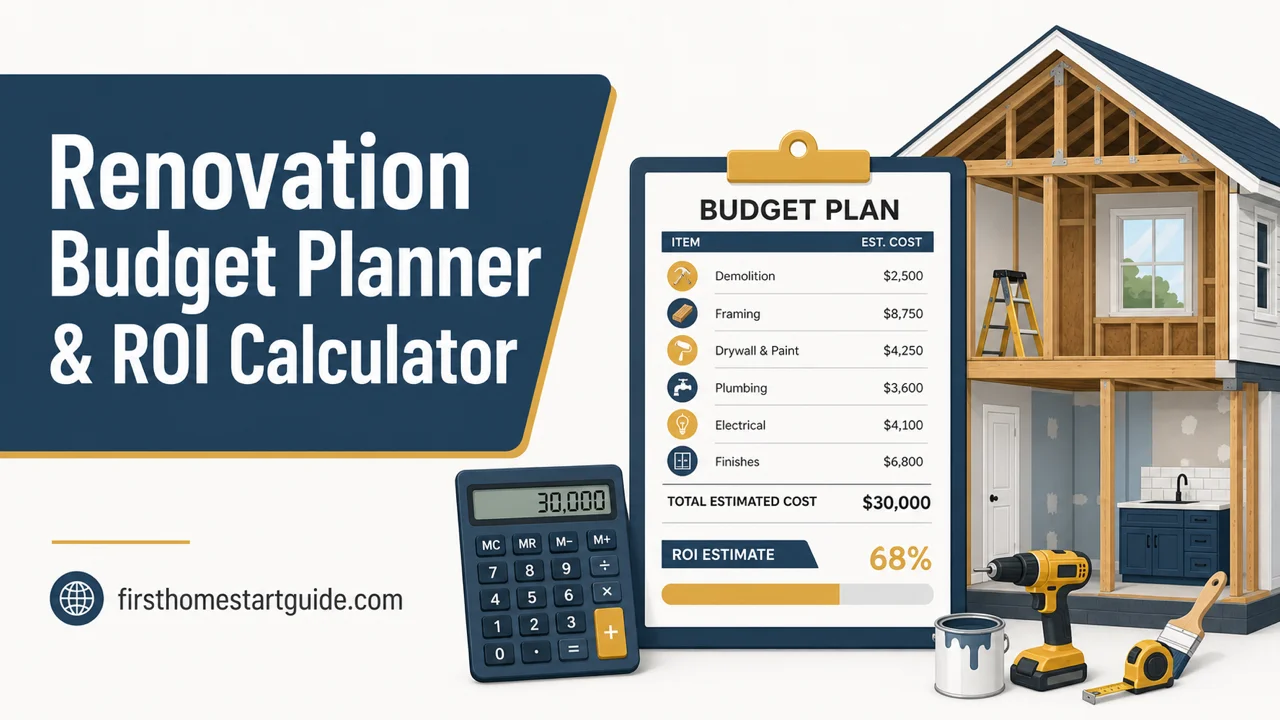
The problem is not that renovation is inherently expensive. The problem is that nobody gives you a financial control system. Free cost estimators give you ballpark ranges. Contractor quotes give you numbers you cannot compare. Spreadsheets give you empty cells. None of them tell you how contractors actually price their work, which cost overruns are predictable, or how to enforce financial discipline once demolition starts. The Renovation Budget Planner is a Renovation Financial Control System --- a structured framework that forces you to budget from data, compare bids on equal terms, and track every dollar against your plan so scope creep cannot quietly drain your reserves.
What's Inside the Financial Control System
A 12-chapter guide, a quick-start checklist, and 10 printable worksheets and checklists --- covering every stage from first estimate through final invoice:
Master Budget Worksheet
A single adaptable worksheet that tracks your entire renovation budget across 9 universal phases --- demolition, structural, rough-in, insulation, drywall, finish, fixtures, exterior, and landscaping --- with separate columns for materials, labour, permits, disposal, and contingency. Works for any project type: kitchen, bathroom, basement, exterior, whole-house, or ADU. Not "renovation costs $X" but "demolition labour costs this, rough plumbing costs this, tile installation costs this, and here is the line where your contractor just added $1,400 you did not approve." Print it and track every dollar from first estimate through final invoice.
Contractor Bid Comparison System
Side-by-side normalisation framework for evaluating quotes that look incomparable. Maps each bid to standardised categories --- scope, materials grade, labour hours, overhead structure, exclusions --- so you can identify why one contractor quoted $18,000 and another quoted $55,000 for the same project. The difference is usually a combination of overhead structure (solo operator vs. full-crew firm), capacity pricing ("go-away bids" inflated by 30-50%), and scope assumptions about finish quality that nobody disclosed. The system makes those hidden variables visible.
ROI Calculator with 2025 Cost vs. Value Data
Project-by-project return benchmarks showing exactly which renovations build equity and which destroy it. Garage door replacement recoups 268% of cost. Steel entry door replacement returns 216%. Manufactured stone veneer recovers 208%. An upscale kitchen gut remodel costing $164,000 recovers just 36%. The calculator helps you allocate capital to the projects that actually increase your home's value --- and stop you from spending $80,000 on a major kitchen remodel that recovers $42,000 at resale.
Contingency Management Framework
Structured reserve tracking that separates your contingency from your working budget. The old 10% rule is inadequate for anything beyond minor cosmetic updates in post-2000 construction. For homes built before the 1950s, for properties with unknown renovation history, and for any project that involves opening walls, the data supports 15-20%. The framework ring-fences this capital and prevents it from being quietly absorbed into scope upgrades --- because once your contingency bleeds into the working budget, every surprise behind the drywall becomes a financial emergency.
Change Order Log and Scope Creep Protocol
Documentation system for tracking every mid-project cost change, with approval workflows that prevent contractors from ordering $4,000 in upgrades without written authorisation. Includes the contractual language ("no unapproved work" clauses) and communication templates that protect you from the most common billing disputes. When a contractor finds rotted floor joists beneath existing tile, this is the system that ensures the remediation cost is documented, approved, and tracked --- not quietly added to your next invoice.
Contractor Pricing Decoder
Breakdown of how contractors actually calculate their numbers. The difference between estimates (non-binding ballpark figures) and binding quotes (legally enforceable, itemised breakdowns). Why capacity-priced "go-away bids" inflate costs by 30-50%. How overhead structures create legitimate price gaps between a solo operator with a van and a firm with branded trucks, project managers, and secure storage. What the "PITA tax" is --- the subjective difficulty premium contractors apply to complex projects or high-maintenance clients --- and how to avoid triggering it. This chapter alone can save you thousands by helping you understand what you are actually paying for.
Project Prioritisation Matrix
Decision framework for households with a fixed budget and competing renovation needs. Uses ROI data, structural urgency, and habitability impact to rank projects objectively. When Partner A wants the dream kitchen and Partner B says the roof is leaking, this matrix resolves the deadlock with financial logic: the roof protects your asset, the kitchen recovers 51% of a major remodel's cost, and the entry door replacement you both ignored returns 216%. Stop arguing from preference. Start deciding from data.
Capital Improvement Log
Receipt tracking and capital improvement classification system for documenting renovation expenses that adjust your property's cost basis. Every dollar of documented capital improvement reduces your taxable gain when you eventually sell. The difference between a "repair" (fixing a leaky pipe) and a "capital improvement" (replacing the entire plumbing system) determines whether that expense saves you money at closing or disappears into the void. In states like New York, capital improvements are also exempt from sales tax on labour --- but only if you provide the right form (ST-124) at the time the contract is signed. The log ensures you capture and categorise expenses correctly from day one, not scramble for receipts at closing.
Financing Comparison Worksheet
Side-by-side analysis of HELOC, home equity loan, cash-out refinance, personal loan, and contractor financing. Maps each option against your project timeline, current rates, and tax deductibility so you choose the cheapest source of capital for your specific situation --- not the option your contractor recommends because it gets them paid fastest.
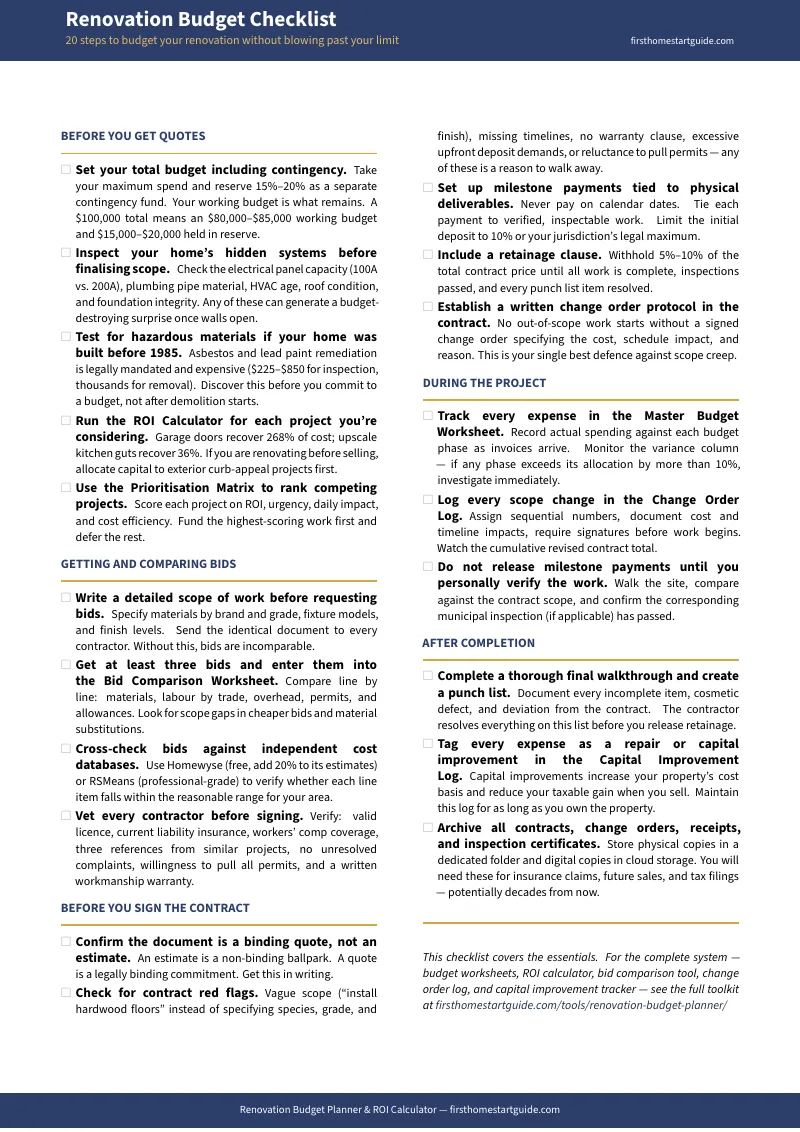
The Free Checklist: 20 Actions That Prevent Budget Blowouts
The Renovation Budget Planner Quick-Start Checklist is a free reference covering the 20 highest-impact budgeting actions from the full toolkit, organised by project phase. Includes the complete ROI tier table showing which projects build equity and which lose money, plus the contingency calculation formula with recommended percentages by project type and home age. Print it and use it as your starting framework before you sign any contract.
Who This Is For
- First-time homeowners renovating a fixer-upper who depleted their liquidity on the down payment and closing costs --- your renovation capital is strictly capped, you have never managed a contractor relationship, and a 16% overrun on a $60,000 budget means choosing between finishing the kitchen and keeping an emergency fund
- Existing homeowners planning a kitchen or bathroom remodel who anchored expectations to prices from five years ago --- you expected $12,000 for a bathroom update and the quotes are coming back at $25,000, and you cannot tell whether that is the market or the contractor padding the bid
- Pre-sale optimisers deciding whether to renovate or sell as-is who need objective ROI data to determine if spending $25,000 on cosmetic updates will raise the sale price by $35,000, or if selling at a slight concession avoids the headache entirely
- Property investors and inheritors running ARV models with 65-68% multipliers and 15% contingency buffers --- you need precise cost tracking and tax-basis documentation, not lifestyle inspiration boards
- Anyone who has received contractor bids that vary by 200%+ and cannot determine whether the lowest bid is dangerously cheap, the highest is padded, or both --- you need a normalisation framework before you sign anything
Why Not Free Tools?
- Online cost estimators (Homewyse, HomeAdvisor) give you zip-code-based averages that consistently underestimate actual contractor pricing by 20% or more. They exist to generate leads for contractors, not to help you manage a budget. They tell you what a bathroom "typically costs" but cannot tell you why your three bids span $18,000 to $55,000, which one is reasonable, or how to enforce financial discipline once the project starts.
- Prop-tech apps (Realm, RenoFi, MyKukun) offer sophisticated pre-construction modelling --- neighbourhood trends, automated valuations, renovation loan qualification. They are excellent at helping you borrow money. They are useless for the tactical reality of tracking receipts against line items, documenting change orders, or preventing a contractor from quietly exceeding allowances without authorisation.
- DIY spreadsheets give you blank cells. They do not tell you what categories to track, how to normalise incomparable bids, what contingency percentage your project type requires, which expenses qualify as tax-deductible capital improvements, or how to structure a change order process that protects you legally. Building the framework is the hard part --- the data entry is trivial.
- Enterprise construction software (Smartsheet, BuildBook, Procore) is built for professional contractors managing multiple job sites, not homeowners managing one project. The learning curve, cost, and complexity are wildly disproportionate to a single residential renovation.
This toolkit fills the gap between "how much does a bathroom cost?" and the financial reality of managing a contractor, tracking scope changes, and protecting your investment. It is the structured framework that takes the combined knowledge of experienced homeowners, construction professionals, and real estate investors and organises it into a system you can use from first estimate through final invoice.
--- Less Than One Contractor's Unapproved Change Order
That $4,000 siding upgrade the contractor ordered without asking you. The $1,050 tile overage on a 60-square-foot mudroom. The $175,000 whole-house overrun that started as a $240,000 estimate. Those are real numbers from real homeowners who had no system for tracking costs, comparing bids, or enforcing approval workflows.
The toolkit gives you the bid comparison worksheet, the change order log, the contingency framework, the ROI calculator, and the capital improvement log. It turns the financial chaos of renovation into a structured control system where every cost is tracked, every change is approved, and every dollar spent can be justified against your original plan.
If it prevents one unapproved change order, one blown contingency, or one overcapitalised project that recovers 36% at resale, it pays for itself before you finish Chapter 2.
Money-back guarantee, no time limit. If the toolkit does not give you the structure and clarity to manage your renovation budget without the financial dread, you pay nothing.
Download the free Renovation Budget Planner Quick-Start Checklist to start with the 20 highest-impact actions and the ROI tier table. When you are ready for the full Financial Control System --- the 12-chapter guide, 10 printable worksheets and checklists, the bid comparison system, the change order log, the contingency framework, and the capital improvement log --- the complete toolkit is here.
Your contractor just sent the estimate. The clock starts now.
Frequently Asked Questions
What if the rules change after I buy?
We update the guide when the rules change. Email us any time, even years later, and we'll send you the current edition free.